How to Get Live Satellite Images: Real-Time Options
Searches for “live satellite images” have exploded in recent years. From natural disasters and severe weather to global conflicts and environmental change, people want to see what is happening on Earth right now.
But despite the phrase being widely used online, most satellite imagery is not truly live. Instead, what users usually access is near real-time satellite data - imagery captured minutes or hours earlier and processed for analysis and visualization.
In this article, we explain what “live satellite imagery” really means, which real-time options actually exist, and how you can access the freshest satellite data available today using free tools and modern platforms like Copernicus Open Access Hub and how OnGeo Intelligence applies.

What “Live Satellite Imagery” Really Means
When people search for live satellite imagery, they usually imagine a real-time video feed from space - similar to a security camera watching Earth. In reality, this kind of continuous, live satellite video does not exist for public civilian use.
Instead, “live” satellite imagery typically means near real-time data. This refers to satellite images that are captured, transmitted, processed, and published as quickly as possible - often within minutes to a few hours after acquisition.
Several factors prevent true live imagery:
- Satellites orbit Earth at high speeds and only capture images when passing over a specific area.
- Data must be transmitted to ground stations and processed before it can be viewed.
- High-resolution satellites prioritize image quality over instant delivery.
As a result, even the fastest satellite systems provide time-stamped snapshots, not live video streams. However, for many applications - disaster response, weather monitoring, or environmental tracking - near real-time imagery is more than sufficient to understand what is happening on the ground.
Understanding this distinction helps users choose the right tools and avoid misleading “live satellite” claims commonly found online.
Examples of satellite images being used in crisis situations:
Types of Near Real-Time Satellite Data
Near real-time satellite data comes in different forms, depending on the satellite’s mission, sensor type, and how quickly the data is processed and released. While none of these provide true live video, each offers fast and reliable insights for specific use cases.
1. Weather Satellite Imagery
Weather satellites are the closest thing to real-time Earth observation. Geostationary satellites continuously monitor the same area and update imagery every 5–15 minutes.
Common uses include:
- Tracking storms and hurricanes
- Monitoring cloud cover and rainfall
- Observing atmospheric patterns
Examples:
- GOES (U.S.)
- Meteosat (Europe)
- Himawari (Japan)
2. Moderate-Resolution Optical Imagery
These satellites capture optical images of Earth’s surface and publish them within hours of acquisition. While not instant, they are fast enough for environmental monitoring and rapid assessments.
Typical applications:
- Flood and wildfire mapping
- Agricultural monitoring
- Urban expansion tracking
Examples:
- Sentinel-2
- Landsat 8 & 9
3. Radar (SAR) Near Real-Time Data
Synthetic Aperture Radar (SAR) satellites actively send microwave signals and can collect data day or night, through clouds. Many SAR datasets are released within a few hours after capture.
Best suited for:
- Flood detection
- Ground movement and deformation
- Disaster response during bad weather
Examples:
- Sentinel-1
- RADARSAT
- TerraSAR-X
4. Low-Resolution, High-Frequency Imaging
Some satellites sacrifice resolution to achieve very frequent global coverage, updating imagery multiple times per day.
Used for:
- Large-scale environmental monitoring
- Early detection of fires or deforestation
- Tracking large-scale changes
Examples:
- MODIS
- VIIRS
5. Commercial Rapid-Tasking Satellites
High-resolution commercial satellites can sometimes be tasked to capture specific locations quickly. While not live, images may be available within hours to a day, depending on priority and cost.
Applications include:
- Infrastructure monitoring
- Conflict and security analysis
- Detailed damage assessment
Examples:
- WorldView
- PlanetScope
- SkySat
Key takeaway: Near real-time satellite data is about speed, frequency, and purpose - not live video. Choosing the right data type depends on how quickly you need the information and how much detail is required.
Best Free Platforms for Near Real-Time Satellite Imagery
If you want the freshest satellite images available without paying a subscription, several reliable platforms provide free near real-time data. These tools vary in detail and update speed, but all offer access that’s strong enough for most monitoring and analysis tasks.
1. NASA Worldview
Website: https://worldview.earthdata.nasa.gov
Best for: storms, dust, large-scale environmental events
Update Timing: Almost instant
Worldview lets you explore global satellite imagery from NASA’s Earth-observing missions like MODIS and VIIRS. You can:
- View daily images
- Animate recent passes
- Download data directly
Because the platform refreshes rapidly, it’s one of the best free resources for watching events unfold in near real time.
2. NOAA Satellite Data
Website: https://www.nesdis.noaa.gov
Best for: Weather monitoring, storms, cloud motion
Update Timing: Minutes to hourly
NOAA’s weather satellites (such as GOES series) continuously observe large regions and provide frequent data updates. These are especially useful for:
- Tracking hurricanes and severe storms
- Monitoring cloud systems
- Observing atmospheric changes
3. FIRMS – Fire Information for Resource Management System
Website: https://firms.modaps.eosdis.nasa.gov
Best for: Near real-time hotspot detection and fire alerts
Update Timing: Within 3 hours
FIRMS uses MODIS and VIIRS thermal data to publish current fire and hotspot alerts worldwide. The interface shows:
- Active fire locations
- Confidence levels
- Downloadable CSV or KML for mapping
For wildfire tracking and fire risk monitoring, this is one of the most practical free tools.
4. Copernicus open access hub
Website: https://browser.dataspace.copernicus.eu/
Best for: Medium-resolution optical and multispectral imagery
Update Timing: Days (often very recent cloud-free scenes)
Use the EO Browser to:
- Preview recent Sentinel-2 and Landsat scenes
- Compare dates and bands
- Download imagery for analysis
While not continuously live, Sentinel Hub provides easily accessible recent imagery that can be close to real time in many regions.
5. Google Earth Engine (Free Tier)
Website: https://earthengine.google.com
Best for: Custom processing and near real-time analysis
Update Timing: Hours to days
Google Earth Engine aggregates satellite datasets and lets you write scripts to:
- Fetch the latest available scenes
- Run change detection or time series
- Export results for visualization
It’s more advanced than a simple viewer, but extremely powerful if you’re ready to work with code.
6. NASA GIBS
Website: https://gibs.earthdata.nasa.gov
Best for: High-frequency global base layers
Update Timing: Daily or sub-daily
The Global Imagery Browse Services (GIBS) provides tiled image layers that update rapidly and are accessible in viewers or as WMS/WMTS services in GIS.
Why These Matter
True live satellite video doesn’t exist for the public, but by using platforms like these you can get near real-time insights that are valuable for:
- Emergency response
- Environmental monitoring
- Weather forecasting
- Conflict or crisis tracking
- Research and reporting
How to View Near Real-Time Satellite Imagery Using Copernicus Data Space (Step-by-Step)
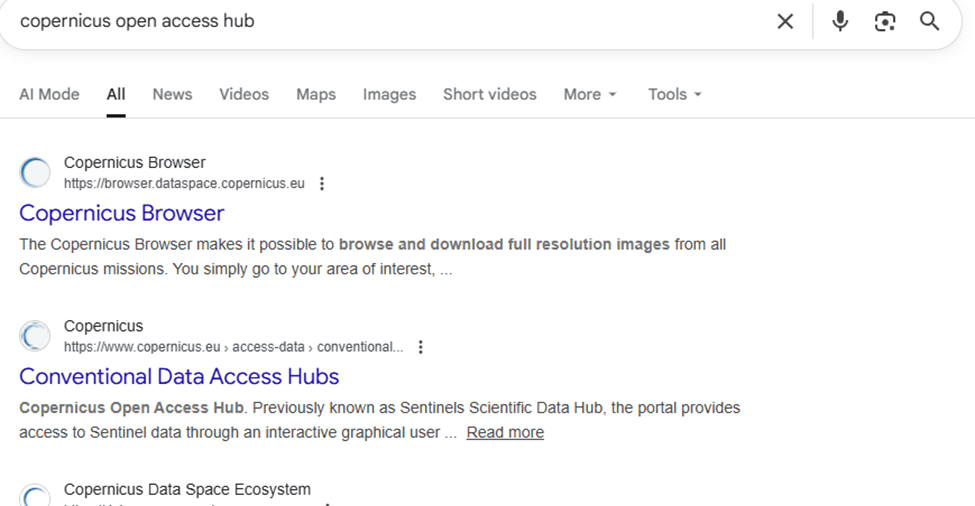
Step 1: Open the Copernicus Data Space Browser
Go to:
https://dataspace.copernicus.eu/browser
This is the official platform of the European Space Agency (ESA) for accessing Sentinel satellite imagery.
Step 2: Log In or Continue with Limited Access
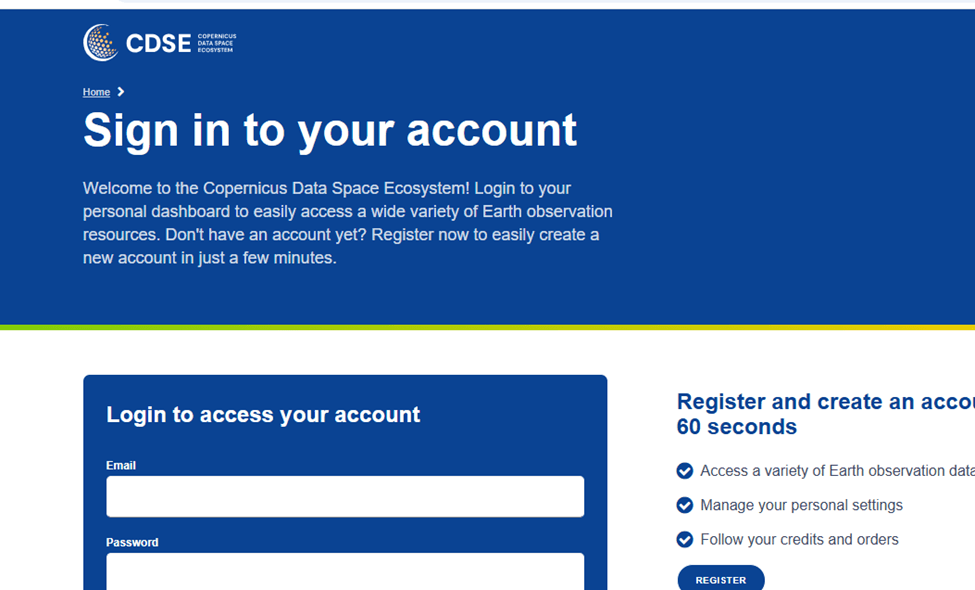
To use all features:
- Click Log in
- Sign in with an existing account or create a free one
Basic viewing is possible without logging in, but downloads require an account.
Step 3: Search for Your Area of Interest
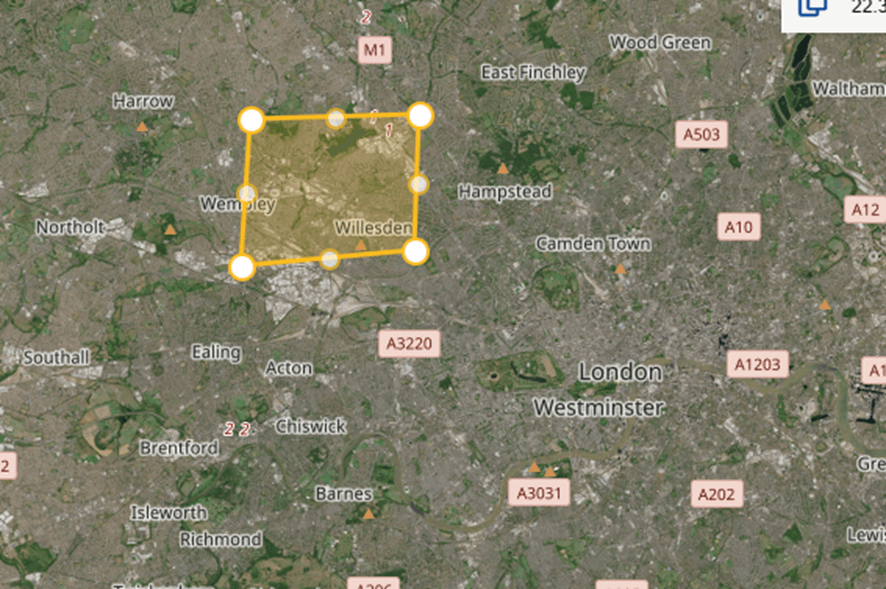
Use the search bar in the top-left corner:
- Enter a place name (e.g., Khartoum, Sudan)
- Or manually zoom and pan on the map
The map will automatically focus on the selected area.
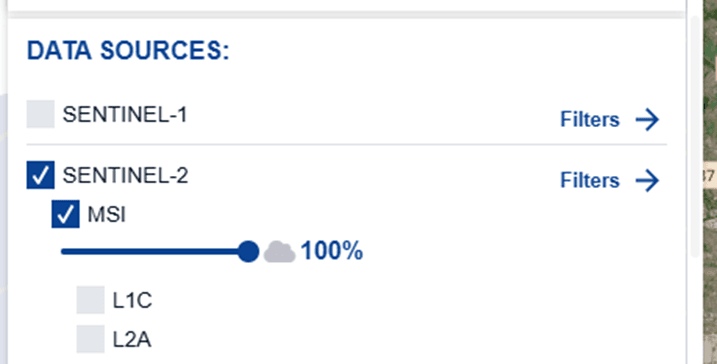
Step 4: Select the Satellite Mission
On the left panel, choose a dataset:
Recommended options:
- Sentinel-2 L2A – Optical imagery (10 m resolution)
- Sentinel-1 SAR – Radar imagery (cloud-independent)
- Sentinel-3 – Environmental and atmospheric monitoring
For visual imagery, select Sentinel-2 L2A.
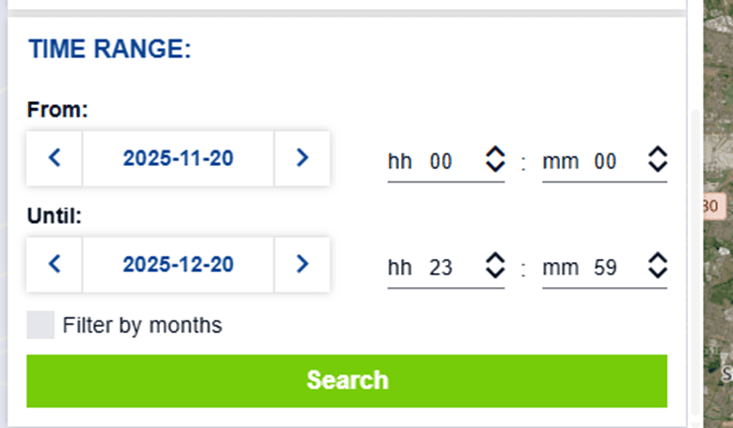
Step 5: Choose a Date or Time Range
Use the date selector to:
- Pick a single recent date
- Or select a date range to compare changes
Copernicus updates Sentinel-2 imagery every 5 days globally.
Step 6: Adjust Visualization Settings
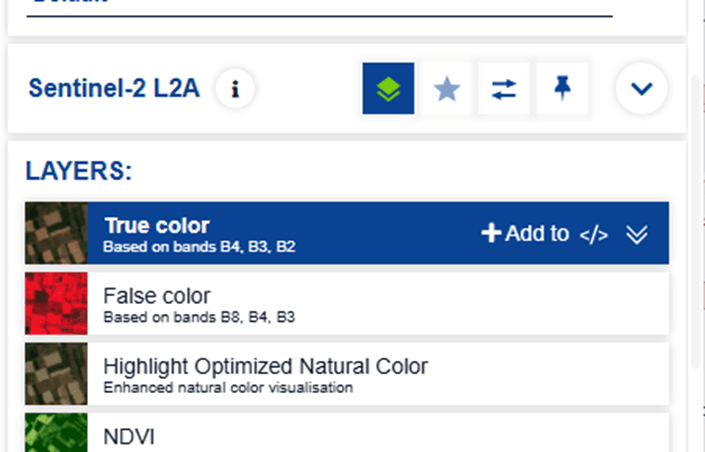
Under visualization options, choose:
- True Color – natural appearance
- False Color – vegetation and land contrast
- Highlight Optimized Natural Color
- NDVI – vegetation health analysis
These presets are pre-configured and require no technical setup.
Step 7: Zoom In and Explore
Use your mouse or zoom controls to inspect details:
- Urban areas
- Agricultural fields
- Rivers, forests, and coastlines
At 10 m resolution, Sentinel-2 provides strong contextual detail for regional analysis.
Step 8: Compare Imagery Over Time
Enable comparison tools to:
- Slide between dates
- Detect environmental change
- Monitor floods, deforestation, or urban growth
This is especially useful for reporting and research.
Step 9: Download the Imagery (Optional)
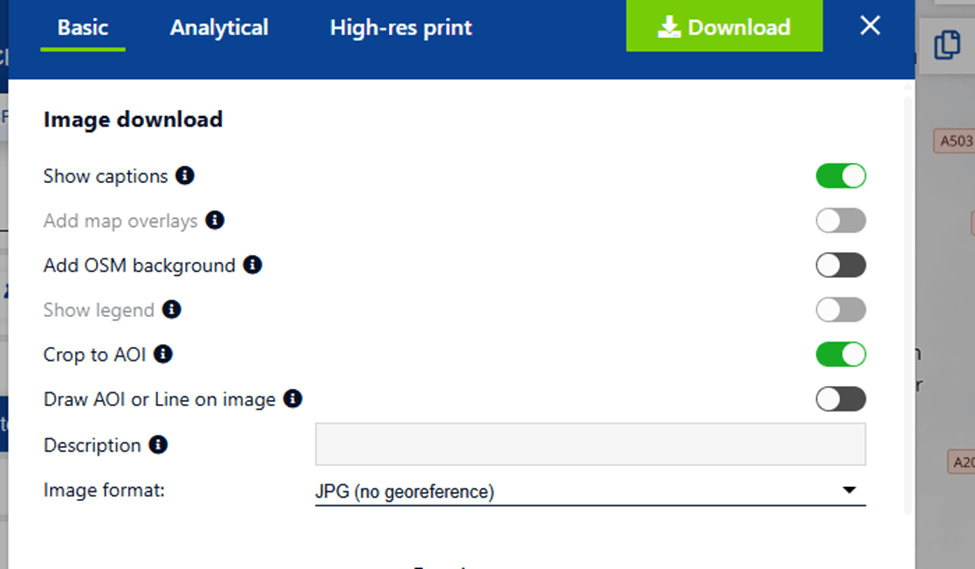
To download:
- Select download (GeoTIFF recommended for GIS)
- You can choose basic analytical or high-res print
- Image download option, (Show options, OSM background, Crop to AOI
- Choose image format (JPG)
- Click Download
Live vs Near Real-Time: A Simple Comparison
The term “live satellite imagery” is often used online, but it can be misleading. In reality, most satellite data available today falls into the category of near real-time rather than truly live.
What “Live” Satellite Imagery Means
True live satellite imagery would mean:
- Continuous video or instant image updates
- Zero delay between capture and viewing
- Constant coverage of the same location
In practice, this only exists for:
- Weather satellites monitoring clouds and storms
- Very low-resolution Earth observation
- Specialized military or classified systems
Public platforms do not provide live video of Earth from space.
What Near Real-Time Satellite Imagery Means
Near real-time imagery refers to:
- Images captured minutes to hours earlier
- Data processed and published shortly after acquisition
- Frequent revisits of the same location
This is the standard for modern Earth observation and is widely used in:
- Disaster response
- Environmental monitoring
- Agriculture and forestry
- Infrastructure and urban analysis
How OnGeo Intelligence Helps Access Fresh Satellite Data
Accessing recent satellite imagery often requires technical knowledge, multiple platforms, and complex data formats. OnGeo simplifies this process by making fresh satellite data easy to access and understandable for a wide range of users.
Unlike traditional satellite data portals, OnGeo removes many of the common barriers to entry:
- No subscription or account creation required
Users can access satellite data without registering or managing ongoing subscriptions. - No specialist knowledge needed
The platform is designed so anyone — not just GIS professionals — can order satellite data in a few simple steps. - Readable, ready-to-use reports
Instead of raw data files, results are delivered as clear, structured PDF reports, making insights accessible to decision-makers and non-technical users. - Free access to Sentinel-2 data
With the code ongeo100, users can generate a report based on Sentinel-2 scenes at no cost, making near real-time imagery available for exploration and learning. - Democratized access to satellite imagery
What was once limited to governments and large organizations is now available to researchers, journalists, planners, and individuals interested in Earth observation.
Learn more about: Satellite Imagery Report
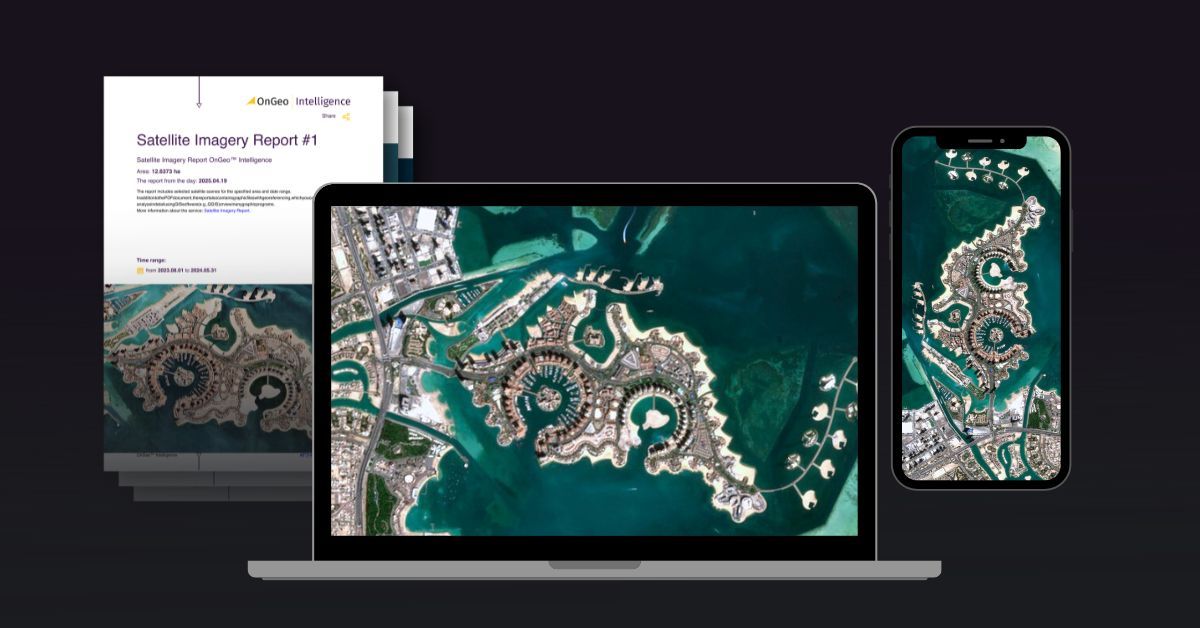
OnGeo Intelligence bridges the gap between complex satellite infrastructure and real-world needs, offering a practical way to access up-to-date satellite imagery without the overhead of traditional GIS workflows.
Accessing the Freshest Satellite Data Today
The idea of live satellite imagery captures the imagination, but in reality, what truly powers modern Earth observation is near real-time satellite data. With revisit times measured in hours or days - not weeks - today’s satellite systems provide timely, reliable insights into what is happening across the planet.
From weather monitoring and disaster response to environmental protection and urban planning, near real-time imagery offers the right balance between speed, resolution, and accessibility. Free platforms like Copernicus Data Space make this data openly available, while tools like OnGeo lower the barrier even further by turning complex satellite information into clear, usable reports.
As satellite constellations grow and data delivery continues to improve, access to fresh satellite imagery will become even more important. Understanding what is truly available - and how to use it effectively - is the key to turning satellite data into meaningful, real-world insight.
Related articles
- Why Metadata Is Essential in Satellite Earth Observation
- Maxar Technologies: An Overview of Satellite & Geospatial Solutions
- Satellite Image Resolution
- Test Our Satellite Data with a Free Satellite Imagery Report
- Satellite Constellations: A Guide to Global Coverage
- How Often Do satelites Take Pictures? Satellite Imagery Frequency
- How to Download High-Resolution Satellite Images